School Carnival & PTA Event Entertainment Guide | Orange County
School events are easier to plan when every attraction has a clear purpose, a realistic operating plan, and a vendor who understands campus logistics. The entertainment should fit the students' ages, the event schedule, the available space, and the level of supervision the school can provide.
This guide helps PTA leaders, school administrators, teachers, and event committees plan entertainment for carnivals, family nights, dances, graduations, student celebrations, and staff-appreciation events in Orange County and surrounding Southern California communities.
Start With the Event Goal
Before comparing rentals, define what the event needs to accomplish. A fundraiser may prioritize steady participation and sponsor visibility. A school dance may need an activity that gives students a break from the dance floor. A family night may need options that parents, students, and siblings can enjoy together.
Answer these questions first:
- Who is attending: students only, families, staff, or the wider community?
- What grades or age groups will participate?
- Is the event free, ticketed, or part of a fundraiser?
- Will entertainment operate continuously or during scheduled rotations?
- Is the goal participation, keepsakes, social sharing, school spirit, fundraising, or a combination?
- Who will approve vendors, placement, branding, and student media policies?
These answers make it easier to choose attractions that support the event instead of competing with it.
Entertainment Options for School and PTA Events
Capture Entertainment offers four different experiences. The right choice depends on the audience, venue, schedule, and type of participation the committee wants.
Staffed Photo Booth
A staffed Photo Booth works well when the school wants an organized experience with a professional attendant helping guests. Depending on the selected package, the experience can include custom designs, prints or digital sharing, backdrops, props, and an online gallery.
This option can fit dances, graduations, family nights, staff events, and celebrations where guests want a familiar keepsake. A custom design can incorporate approved school colors, event wording, or sponsor recognition.
360 Video Booth
A 360 Video Booth emphasizes movement and short-form video. Guests pose or dance while the camera creates a high-energy clip. Capture Entertainment's current experience includes a professional attendant, custom overlay, guest sharing, and an online gallery.
It can be a strong choice for dances, graduations, reward events, and older-student celebrations. Because it uses moving equipment and attracts spectators, it needs thoughtful placement, a clear operating area, and an orderly line.
Drop-Off Photo Booth
A Drop-Off Photo Booth is a self-service digital experience delivered and set up before the event. Guests can create photos, GIFs, boomerangs, and videos, use filters, and share their content. An online gallery and custom overlay are included with the current service.
This option can work well when the committee wants a flexible experience that remains available for a longer event window without a dedicated booth attendant. The school should still assign an adult or event volunteer to monitor the area, support age-appropriate use, and keep the line moving.
Game Truck
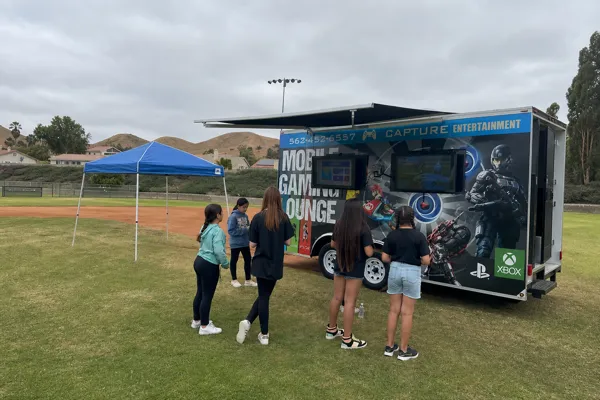
The Game Truck provides a climate-controlled mobile gaming experience with multiplayer games and event-day support. It can be especially effective for birthdays, reward events, family nights, graduations, and school celebrations where gaming matches the students' interests.
The planning team must confirm parking, arrival access, operating space, student flow, and any campus restrictions before booking. Game availability and suitability should also be discussed for the participating age group.
How to Choose the Right Experience
Use the event's operating needs—not just the attraction's appearance—to make the decision.
Choose a staffed photo booth when the school wants guided participation, familiar photos, and package options that may include prints.
Choose a 360 booth when movement, video, and a high-energy focal point fit the audience and the venue has an appropriate operating area.
Choose a drop-off booth when flexibility and self-service access are more important than having a dedicated booth attendant.
Choose a Game Truck when gaming is a strong match for the students and the campus has suitable access and parking.
Larger events may use more than one experience to serve different age groups or reduce pressure on a single line. If the budget allows only one attraction, prioritize the option that best serves the largest share of attendees.
Build a Realistic Event Layout
Placement can determine whether an attraction feels organized or disruptive. Walk the proposed route before confirming the rental.
Check the following:
- Vendor arrival and loading instructions
- Gates, elevators, stairs, door widths, and restricted areas
- Level operating surfaces and overhead clearance
- Available electrical access and safe cord routing, when required
- Cellular service or venue Wi-Fi for digital sharing
- Guest entry, exit, and line direction
- Distance from food service, performances, emergency exits, and quiet areas
- Outdoor weather exposure and a backup location
- Game Truck parking, turning space, and campus vehicle rules
Do not estimate from memory. Send the vendor the event address, venue name, proposed setup location, access instructions, and photographs or a floor plan when possible.
Plan for Lines and Participation
Popular attractions can create congestion when participation is left completely unstructured. Estimate when the largest groups will arrive and decide how the line will be managed.
Useful approaches include:
- Opening the attraction before the busiest program segment
- Creating grade-level or classroom rotations for large events
- Posting simple participation instructions near the line
- Assigning an adult volunteer to help with student flow
- Keeping exits, vendor work areas, and walkways clear
- Announcing closing time before the final session
For ticketed carnivals or fundraisers, decide in advance whether the attraction is included with admission, requires tickets, or is sponsored. Share that information with the vendor so the operating plan matches the school's process.
Confirm Vendor and Campus Requirements
Every school or district may have different requirements. Ask the school office or district contact what must be completed before the vendor arrives.
The checklist may include:
- Vendor agreement or purchase order
- Current insurance documentation or certificate requirements
- Additional-insured wording requested by the school or district
- Background-check or campus-access rules
- Arrival, parking, and loading instructions
- Approved operating hours
- Emergency and weather procedures
- Electrical or facilities approval
- Student photography, consent, and sharing policies
Capture Entertainment can provide current business and insurance documentation for review when requested. The school or district decides which documents and policy requirements apply to its event, so confirm them early rather than waiting until event week.
Protect Student Privacy and Follow School Media Policies
Photo and video experiences can involve student images, personal devices, digital delivery, and online galleries. The event organizer should confirm the school's media, consent, and sharing policies before selecting the setup.
Discuss:
- Whether students may receive content by text, email, or AirDrop
- Whether an online gallery is appropriate for the event
- Whether public social sharing should be encouraged, limited, or disabled
- Who may participate and whether parent or guardian consent is required
- Whether sponsor logos, school marks, or student names may appear in designs
- Who should receive the final gallery link
The vendor can explain the available experience and sharing methods, but the school remains responsible for determining its own privacy and consent requirements.
Create an Event-Day Responsibility Plan
Write down who owns each decision. A simple responsibility plan prevents last-minute confusion.
Assign contacts for:
- Vendor arrival and campus access
- Final setup approval
- Power, facilities, or parking questions
- Student line supervision
- Weather decisions
- School branding approval
- Media and consent questions
- Event closing and vendor departure
Give the vendor one primary event-day contact and one backup. Make sure both contacts can answer calls or messages during setup.
School Event Planning Timeline
Six to twelve weeks before
- Confirm the event goal, attendance estimate, venue, and budget
- Compare entertainment options and check availability
- Ask the school or district for vendor requirements
- Reserve the preferred experience once the date and scope are approved
Three to six weeks before
- Confirm the layout, loading route, parking, power, and backup location
- Submit required vendor and insurance documents
- Provide approved colors, logos, wording, and sponsor details
- Decide how lines, tickets, rotations, and student supervision will work
One to two weeks before
- Reconfirm arrival time and operating schedule
- Share the final campus map and event-day contacts
- Review weather and contingency plans
- Confirm media, consent, and gallery-delivery decisions
Event day
- Keep the loading route and setup area clear
- Have the designated contact available for arrival
- Confirm the attraction is placed as approved
- Brief volunteers on line flow and closing procedures
- Communicate schedule changes to the vendor promptly
Questions to Ask Before Booking
Use these questions when comparing school-event vendors:
- What exactly is included in the selected package?
- Is an attendant included, or is the experience self-service?
- What space, access, parking, and power are required?
- How early will the team arrive for setup?
- What happens if the event moves indoors or weather changes?
- How are photos or videos delivered to guests and the organizer?
- Can the design use approved school colors, logos, or sponsor branding?
- What insurance or business documents can be provided?
- Are there travel, access, overtime, or event-specific charges?
- Who is the event-day contact if the schedule or setup changes?
Plan Your Orange County School Event
A successful school attraction should be engaging for students, manageable for volunteers, appropriate for the venue, and clear about privacy and supervision. The best choice is the one that fits the school's actual operating plan—not simply the attraction with the most features.
Capture Entertainment serves school and PTA events with staffed photo booths, 360 Video Booths, self-service Drop-Off Booths, and Game Truck experiences. To discuss your event, check availability with the date, school address, event type, estimated attendance, student age range, venue plan, and any district requirements.
